
PREV_LEC NEXT_LEC
kernel module with out init function, with out exit function and with out init and exit function
Hello students welcome back to free linux kernel development course! in this lecture i will explain how to use function calls in kernel modules, lets begin
Assume you have two functions fun1.c and fun2.c now fun1.c will use api which is in fun2.c then you will compile them into single kernel object file, let us see how we can use function call in kernel modules.
 void fun_2(void);

static int fun1_init(void)
{
	printk(KERN_INFO "In fun1 init\n");
	fun_2();
	return 0;
}
fun1.c
 void fun_2(void)
{
	printk(KERN_INFO "Hello from fun_2\n");
}
fun2.c
Makefile
 obj-m := twofun.o
twofun-objs := fun_1.o fun_2.o
combined obj file is twofun.ko
Creating Two Kernel Modules from Single Makefile
so if you want to create two kernel modules from a single make file then we should follow below approach,
 #include<linux/kernel.h>
#include<linux/module.h>
#include<linux/delay.h>

MODULE_LICENSE("GPL");

static int pg1_init(void)
{
	printk(KERN_INFO"%s: in pg1_init api\n",__func__);
	return 0;
}
static void pg1_exit(void)
{
	printk(KERN_INFO"%s:in pg1_exit\n",__func__);
}

module_init(pg1_init);
module_exit(pg1_exit);
pg1.c
#include<linux/kernel.h>
#include<linux/module.h>
#include<linux/delay.h>

MODULE_LICENSE("GPL");

static int pg2_init(void)
{
	printk(KERN_INFO"%s: in pg2_init api\n",__func__);
	return 0;
}
static void pg2_exit(void)
{
	printk(KERN_INFO"%s:in pg2_exit\n",__func__);
}

module_init(pg2_init);
module_exit(pg2_exit);
pg2.c
obj-m := pg1.o
obj-m += pg2.o
all:
	make -C /lib/modules/$(shell uname -r)/build M=$(PWD) modules
clean:
	make -C /lib/modules/$(shell unme -r)/build M=$(PWD) clean
Makefile
obj-m := pg1.o
obj-m += pg2.o
+ symbol will help you create multiple kernel object files in a single make file, now you can see two .ko generated in the folder pg1.ko and pg2.ko.
TIP: you can only load one module at a time not more,, but you can remove two modules at a time.
Kernel module with out init function:
Now let us discuss if we can have a kernel module with out init function, what will happen if we remove init function from the kernel module. We all know that a typical linux kernel module will contain two important functions, 1.Initialization function and 2. cleanup function
 module_init(init_function);
module_exit(exit_function);
kernel init and exit functions , but in kernel programming we also have an option to have a kernel module with out init function, so let us see how it works, so normally when you load the kernel module using
insmod module.ko the linux kernel will load the .ko file into the kernel memory and then calls the initialization fuction registered with module_init(), thenthe function performs the setuptasks like memory allocation, driver registration, hardware initialization, and device file creation
when init function is not present:
still a kernel module can exist with out init function in such scenarios the module is loaded into the kernel so you can see it loaded This means it simply gets linked with the kerel.
Tip: a kernel module can exist with out init function and can be still loaded into kernel and when you do rmmod it will remove the existing module then exit function will hit and if you have added any logs in exit function, you can see them in dmesg. to insert the module just give
sudo insmod remove_init.ko
Module                  Size  Used by
remove_init            12288  0
lsmod | less –> you can see the module inserted but in dmesg you will not see any entry logs.
when you give rmmod and remove_init.ko then you can see exit logs in dmesg, but always remember you should have root permission.
[ 3478.262545] test_only_exit:In only exit
[ 3673.877035] test_only_exit:In only exit
in dmesg you can only exit function logs, below is the complete code with out init function.
#include<linux/kernel.h>
#include<linux/module.h>
#include<linux/delay.h>

MODULE_LICENSE("GPL");
static void test_only_exit(void)
{
	printk(KERN_INFO"%s:In only exit \n", __func__);
}
module_exit(test_only_exit);
remove_init.c
obj-m := remove_init.o

all:
	make -C /lib/modules/$(shell uname -r)/build M=$(PWD) modules
clean:
	make -C /lib/modules/$(shell uname -r)/build M=$(PWD) clean
Makefile
Kernel module Loading Flow:
when init_module() system call is executed then kernel follows below sequence
#insmod module.ko
        |
        v
init_module() system call
        |
        v
load_module()
        |
        v
do_init_module()
kernel module loading flow
What is the need of load_module()
load_module will do the necessary tasks like
- memory allocation for module
- copy the module from user space to kernel space
- verify the ELF format
- Symbol resolution
do_init_module() why we need it?
kenrel will check if the module will exist or not if init_function exists then call the init function if it does not exit simply ignore, but the scenario is different in exit call, that we will see in next topic.
Kernel module with out exit function:
Now let us discuss what will happen if we write a kernel module with out exit function, so first understand that if you remove exit function from your kernel module, you will not see any compilation error, kernel object also created successfully and you will be able to insert the module, but here comes the challenge you will not be able to remove the module. you will face error. So let us see what error you will see when you remove the exit function.
before that let me explain why you need exit function, when module is inserted it will be allocated with resources like memory, drivers, interrupt handlers, kernel threads, timers so when you remove the function the exit function will do the necessary cleanup of this resources. if clean up is not proper then you will see some potential issues like memory leaks, resource conflicts, kernel instablity. that is the reason exit function is needed
delete_module() is the system call that is implemented in the kernel source code kernel/module/main.c
SYSCALL_DEFINE2(delete_module, const char __user *, name_user, unsigned int, flags)
syscall for delete module, inside the delete_module() the kernel checks whether the module has an exit function, whether the module is currently in use or not , so if the module does not contain exit fucntion then the kernel will refuse to remove the module and you will see an error -EBUSY, which means device or resource is busy.
#include<linux/kernel.h>
#include<linux/module.h>
#include<linux/delay.h>
MODULE_LICENSE("GPS");
static int hello_init(void)
{
	printk(KERN_INFO"%s: In init \n", __func__);
	return 0;
}
module_init(hello_init);
no_exit_fun.c,
#obj-m := no_exit_fun.o

all:
	make -C /lib/modules/$(shell uname -r)/build M=$(PWD) modules
clean:
	make -C /lib/modules/$(shell unme -r)/build M=$(PWD) clean

Makefile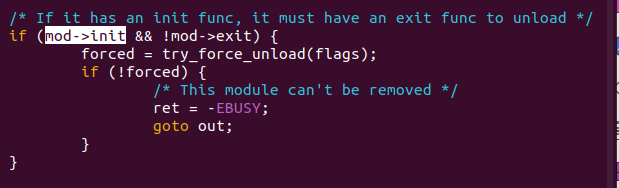
you can sinc the latest kenrel source code from official git repository :
https://git.kernel.org/pub/scm/linux/kernel/git/torvalds/linux.git
and then you can navigate to this folder.
linux-6.19-rc5$ vi kernel/module/main.c
Kernel module with out init and exit function.
#include<linux/module.h>
MODULE_LICENSE("GPL");
if you remove both init and exit function from a kernel module, a module is still generated and loaded and you can check the same from lsmod | less you will see our remove_both.ko inserted and if you remove it will also get removed, but you will not see any error, why? this is left as an exercise to students to practice and comment if you have any doubts.
Free learning to all!!
EmbeddedPathashala.